EXO Star Runner and announced future Exoland titles are original platform experiences, not republished licensed games. Play them only through official Exoland channels.
Exoland is a Web3 gaming platform built around original interactive games and a wallet-connected player identity. Enter the arcade, explore new adventures, compare your best runs and discover future digital collectibles — all through the official Exoland experience.
Our first playable title is EXO Star Runner, a fast space arcade game. Neon Racers is the next title in development. Exoland combines real gameplay with public-wallet eligibility checks; its arcade is not a token trading service.
Exoland titles are original platform experiences — not redistributed licensed games.
EXO Star Runner and Exoland’s announced future titles are original games developed for the Exoland platform. Exoland does not present third-party licensed games as its own or operate as a catalog of games licensed from other studios.
The gameplay, world-building, creative identity and Exoland-specific title presentation are intended for play through exoland.xyz. An unrelated website, mirror, copied application or NFT listing is not an official Exoland game simply because it uses EXO names or imagery.
The games and Exoland branding are proprietary platform content. This does not mean that general web standards, wallet software or independently owned third-party marks used in the experience belong to Exoland. See Terms for intellectual-property and permitted-use conditions.
Play original Exoland titles only through official Exoland pages.
Do not reproduce, repackage, mirror or monetize game files or artwork without authorization.
Report suspected copies or deceptive domains using the official Support channel.
The Exoland homepage connects the main player-facing areas into one universe. Each section has a distinct purpose; some are currently playable and others show what is in development.
A clear distinction between available games and planned features.
FEATURE
TODAY
EXO Star Runner
Playable in browser after wallet connection and EXO-holder check.
Top 10 leaderboard
Shared, public beta ranking for Star Runner.
Player callsign and ship avatar
Available locally on the current browser/device.
Neon Racers
Announced upcoming title; not yet playable.
Skin and spaceship marketplace
Concept preview; no live checkout.
Minting or trading Exoland NFTs
Not enabled.
Transferable EXO gameplay prizes
Not enabled.
Features may change before launch. Screenshots, concept art and descriptions are not a guarantee of launch date, pricing, blockchain functionality or token distributions.
Exoland uses wallet-based connections so you can enter with an address you control rather than a conventional email-and-password account. The wallet confirms which address is connected; the homepage then checks eligibility for the supported game.
Tap or click Connect Wallet.
Choose an available browser wallet or select WalletConnect QR.
In your wallet, review the website, networks and connection permissions.
Approve the connection if you recognize the request.
Return to Exoland to view your player status and access check.
If the wallet is not detected, try opening Exoland in your wallet’s in-app browser or use the QR pairing option in a supported desktop browser.
Any positive balance on a supported network unlocks the game.
Star Runner uses an EXO-holder access check. You only need a positive amount of the official EXO token in the connected wallet on at least one supported blockchain. There is no minimum number above zero for the current access rule.
NETWORK
EXO TOKEN CONTRACT
Ethereum
0xbd8005612124DC30601E22D8B5d188A89767c640
Polygon
0xbd8005612124DC30601E22D8B5d188A89767c640
BNB Chain
0x7D10B6157C7C577CAa62D319dC215209Cf2dB8C3
The balance is checked without transferring your EXO. A balance on one of these networks can qualify even when your wallet is connected on a different supported network. If a network is temporarily unreachable, eligibility may remain unconfirmed until a later check.
If the connected wallet has no detectable EXO balance, Exoland cannot unlock Star Runner for that address. The interface offers a route to Exoswap, where you can independently investigate token availability and any supported swap route.
Confirm you connected the address where you actually hold EXO.
Verify the token is the official contract on Ethereum, Polygon or BNB Chain.
Use Check Again after a balance changes or a network service recovers.
Compare network gas, price impact and liquidity in any trading interface before signing a swap.
Use the Log Out or Disconnect Wallet option in Exoland to remove the active wallet connection from the current browser session. A wallet app may also have its own connected-sites or WalletConnect session management.
Finish or close any active run.
Choose Log Out or Disconnect Wallet.
For a full session removal, check the connected-site list in your wallet app.
Connect the other address and let Exoland check its EXO eligibility.
Disconnecting does not erase public blockchain activity or automatically delete leaderboard records submitted to the platform. Local profile data may remain in browser storage; refer to the Privacy Policy.
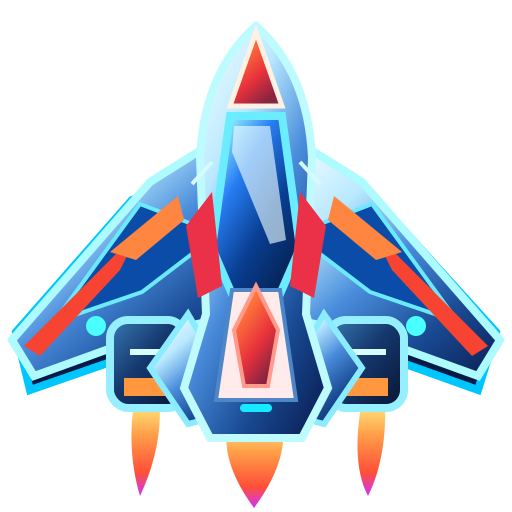
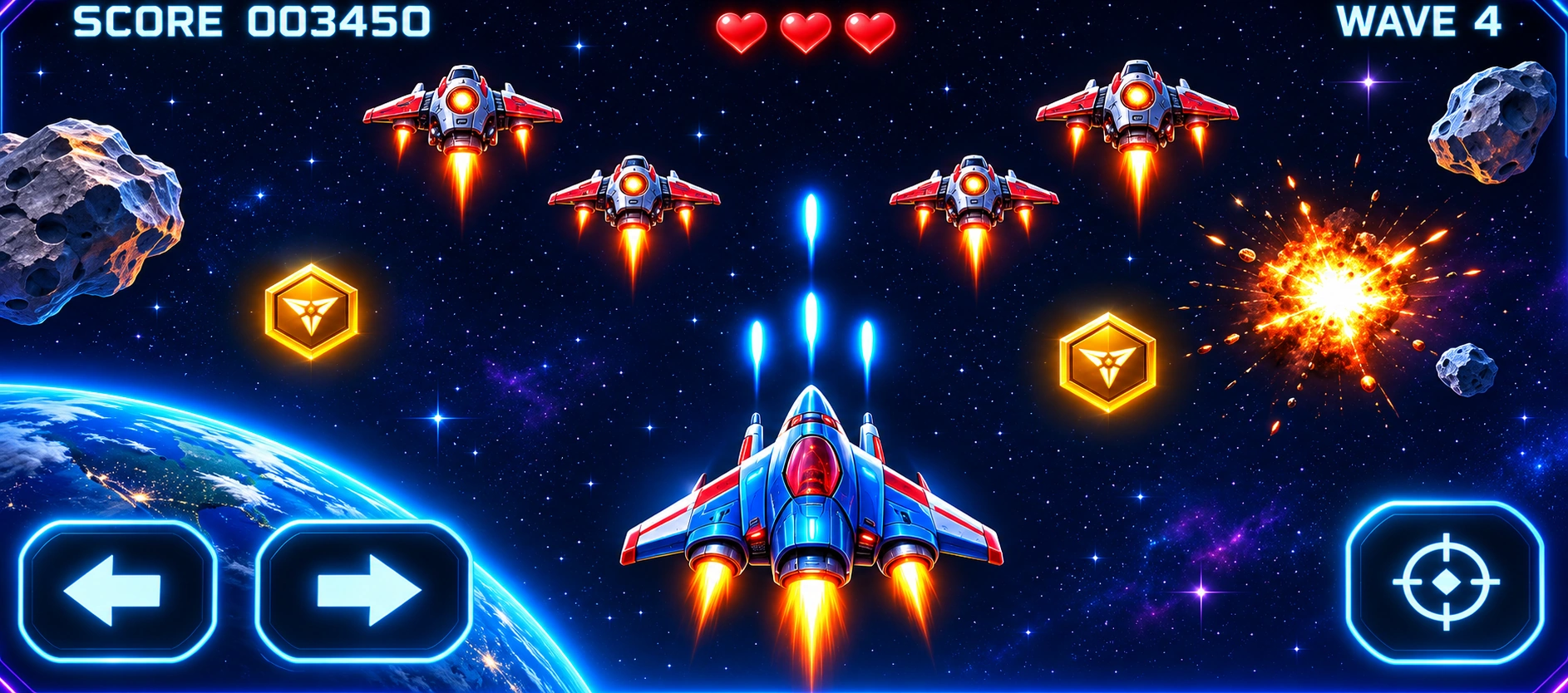
EXO Star Runner is Exoland’s original space-action arcade experience. Take control of the EXO spacecraft, dodge hostile fire, collect in-game arcade coins and clear four waves culminating in a final commander encounter.
Every run starts with three lives. Enemies arrive from above while your spacecraft moves across the playfield. Destroying enemies increases the score and charges the pulse meter. Coins picked up inside the arcade also contribute to gameplay feedback.
Stay alive while enemy ships and shots cross the screen.
Shoot incoming targets to accumulate points.
Collect arcade coins where safe to do so; avoid risking all lives for a pickup.
Use the pulse weapon strategically when fully charged.
Defeat the final commander to complete the mission.
The run ends in Mission Complete or Game Over. Either outcome may produce a score, subject to the active leaderboard rules and successful server registration.
On desktop, keep Star Runner in the active browser window while playing. If the game does not receive keyboard input, click inside the arcade panel and try again. Avoid browser keyboard shortcuts that steal focus.
The game is tuned for browser play; use a reasonably current browser and disable incompatible extensions if the canvas stops responding.
Star Runner supports touchscreens. Use the on-screen LEFT and RIGHT controls under the playfield while holding FIRE with the other thumb. The PULSE control activates when ready.
Left thumb: hold or tap a direction button for movement.
Right thumb: hold FIRE while steering.
Alternatively drag the ship directly on the playfield, which supports automatic firing while dragging.
Use landscape or portrait according to your screen and current layout; avoid covering incoming enemies with your thumb.
Arcade coins collected during the run. Not cryptocurrency.
Pulse
Charge progress toward the special attack.
Best
Personal best score as presented by the game.
The word EXO appears both in the wider blockchain ecosystem and on game artwork. Inside Star Runner, the coin counter refers to a virtual gameplay collectible only, not an on-chain token balance.
Star Runner includes optional synthesized arcade audio. Sound is user-controlled and is not required to play. The pause control lets you stop and resume the active game where supported.
Use Music to enable or disable audio.
Avoid switching applications repeatedly during a run; the browser may suspend the page.
Close heavy background tabs if animation becomes slow.
Allow the page to load images and game resources before starting.
On an unstable connection, confirm the server accepted the mission before trusting the final score status.
Game speed and input responsiveness depend partly on device performance. A paused or backgrounded browser may not maintain the same timing as an active session.
Neon Racers is the next announced Exoland title. It is a future racing experience and is currently represented by concept artwork and a coming-soon notice. Do not treat the preview as a playable or purchasable release.
Its planned place in the Exoland universe is a separate gameplay mode with its own future ranking. Player identity and cosmetic systems may expand across titles, but cross-game compatibility and launch timing are not guaranteed until released.
Exoland games are original creations presented through the Exoland platform. Their names, character designs, play experiences and associated artwork are not a license for visitors to publish copies of the games or operate their own EXO-branded arcade.
Access grants a limited opportunity to use the game, not ownership of its source code, art or characters.
Screen recordings, fan content and commentary remain subject to the applicable Terms and other rights.
Official NFTs, if ever introduced, would confer only the specific rights stated with the digital item — never automatic ownership of the underlying game.
If you encounter a website selling “licensed EXO Star Runner game packages,” treat it as unaffiliated unless independently confirmed through official channels.
An address is an identifier, not a bank account with Exoland.
When you connect an EVM-compatible wallet, Exoland can display its public address and associate a local player interface with that address. The wallet remains under your control. Exoland does not require a conventional password to enter the current arcade.
The current gameplay connection does not establish a server-verified, recoverable account. Profile information can be local to the device, while leaderboard entries are sent to the platform server separately. Never assume the player nickname or all local records synchronize automatically between browsers.
Exoland currently recognizes EXO holdings on Ethereum, Polygon and BNB Chain for its game access check. A token with the same name or ticker on an unrelated chain does not qualify unless Exoland expressly adds that contract.
CHAIN
PURPOSE
Ethereum
EXO-holder access eligibility.
Polygon
EXO-holder access eligibility.
BNB Chain
EXO-holder access eligibility.
A wallet’s selected connection network and the network where EXO is held are related but not identical. Exoland checks eligibility across supported EXO deployments without requiring you to transfer tokens between networks.
A token logo or ticker alone is insufficient to establish authenticity. Before buying or importing EXO in a wallet, compare the chain and contract address with the official token references.
CHAIN
OFFICIAL EXO CONTRACT
Ethereum
0xbd8005612124DC30601E22D8B5d188A89767c640
Polygon
0xbd8005612124DC30601E22D8B5d188A89767c640
BNB Chain
0x7D10B6157C7C577CAa62D319dC215209Cf2dB8C3
A copied token name, fraudulent airdrop or similarly styled token contract can be used in scams. Do not assume EXO tokens sent without explanation are authentic.
The game access interface asks whether a given public address has a detectable positive balance of the recognized EXO token on one of the supported networks. The result is presented as an access status, not a financial statement.
A positive detected balance on any supported network permits the current free gameplay flow.
A zero balance leaves the game locked for the connected address.
If external chain data cannot be reached, a check may remain pending or fail rather than assuming you are eligible.
Changes to balances may require a new check. You can use the refresh control when shown.
We do not state the internal service layout, security routing or validation architecture in player-facing documentation. Only the eligibility outcome and expected wallet permissions are relevant to normal play.
Connecting a wallet shares a public address and may request permission for supported networks. It is not the same as approving a smart-contract allowance or signing a blockchain transaction.
Connect: grants a website access to the address and supported connection details.
Read-only check: inspects publicly available token holdings without spending EXO.
Transaction: a separate wallet operation that may cost network gas and move assets. The currently live Exoland arcade does not need this for play.
Check that the page is served from https://exoland.xyz/.
Make sure your wallet app and browser are updated.
If a QR does not appear, close the connection window and retry from an active secure browser tab.
If an older connection is stuck, disconnect Exoland in the wallet app and establish a new connection.
For unsupported-chain errors, approve a compatible network when the wallet offers it; avoid blindly authorizing unfamiliar chain prompts.
If the address connects but access is denied, confirm EXO holdings and retry the eligibility check.
Connection pop-ups or QR pairing may be blocked by browser privacy features, restrictive extensions or an outdated wallet app. Avoid disabling wallet anti-phishing warnings just to connect.
Your Player ID is the presentation layer for your wallet-connected Exoland experience. It shows a shortened public address, the selected spacecraft avatar and a callsign you choose. It is separate from custody of the EXO token.
Your public wallet address links the interface to a blockchain identity.
Your callsign is the display name associated with your player experience.
Your ship avatar is a cosmetic selection in the profile.
Your best score is shown in the interface, while accepted public leaderboard records are stored by the platform.
Enter a callsign using the characters permitted by the interface.
Select one of the available ship avatars.
Save the change and confirm that the profile updates.
Choose names suitable for an international gaming community. Avoid impersonating a brand, another player or staff. Display names may appear alongside ranking entries, subject to moderation and product behavior.
Changing a local callsign does not necessarily rewrite all previously accepted leaderboard records immediately. Rankings may retain the display name captured for a recorded run.
There is an important distinction between the information saved by your current browser and the public ranking maintained by Exoland.
INFORMATION
CURRENT BEHAVIOR
Profile callsign, avatar and some preferences
Stored locally in your browser.
Current game score and local best
Maintained in the browser during play.
Accepted competitive score
Recorded by the Exoland server for the shared leaderboard.
NFT inventory or purchased items
Not active in the current public release.
Clearing browser storage, switching devices or using a different wallet can change the local profile view. The shared Top 10 depends on the saved server record, not solely on the local high-score number.
Never share wallet seed phrases, private keys or full recovery credentials.
Check the destination URL each time you reconnect.
Use the disconnect option on shared computers.
Keep your browser, wallet app and operating system updated.
Review connected-site permissions in your wallet periodically.
Exoland staff will never need your seed phrase to recover a leaderboard result or help with a missing EXO balance. If you suspect compromise, follow your wallet provider’s guidance immediately.
EXO Star Runner has a public Top 10 leaderboard. Accepted results are compared so players can see the highest scores and follow their standing. The game panel also offers an in-game ranking view.
The leaderboard uses the best accepted score for each wallet and game rather than filling every position with repeat attempts by the same player. A player outside the Top 10 may still see their own rank when the service can calculate it.
For a competitive result to appear globally, the game must be able to register the mission and send the completed result to the server. If a run remains local, the public ranking may not change even if your score is visible inside the arcade.
Connect the wallet and pass the EXO-holder check.
Begin a mission after the game has acknowledged registration.
Play until Mission Complete or Game Over.
Read the on-screen score confirmation.
Open or refresh the leaderboard to confirm your standing.
A rejected or interrupted submission does not become an official leaderboard score. Do not assume a screenshot alone can replace the server’s result record.
The table can show rank, callsign, abbreviated wallet and best score. As players post new accepted personal bests, positions can move up or down. A refresh may be necessary to see the latest recorded state.
Rank movements are an interface view of successive ranking snapshots, not guaranteed real-time alerts. Other players may submit results between your checks. Tie ordering may be determined by the leaderboard’s current competition rules.
Look for your own position or callsign where supported.
Compare best scores rather than only the most recent attempt.
Do not treat a temporary loading or maintenance state as a lost record.
Mission not registered: the game could not create a valid competitive run before starting.
Score not saved: the result was not accepted or the connection failed at the end.
Old score still shown: the existing best may exceed your new result.
Different wallet: your score may belong to another connected public address.
Ranking temporarily unavailable: the table may be unable to load current server data.
Before opening a support request, try a fresh run after verifying wallet connection, EXO access and the game registration status. Save the exact message, the approximate time and the public wallet address — but never share a recovery phrase.
Star Runner’s ranking is based on gameplay performance. Wallet connection and EXO holding enable access to the game, but holding a larger EXO balance does not improve the spaceship, multiply the score or buy a higher leaderboard position.
A leaderboard position is not a transferable asset.
Current rankings do not pay out EXO, NFTs or cash.
Repeated attempts are permitted subject to fair-play and abuse rules.
Cheating, automated score fabrication and impersonation are prohibited.
Exoland is developing ideas for customizable spacecraft, skins, avatars, world themes and other digital collectibles. These may become part of a future gaming marketplace, potentially including NFTs where they provide meaningful player utility.
The Collectibles Hub on the homepage currently displays concept previews. A concept image does not represent an NFT already minted, a listing offered for sale or a collectible held in a user’s wallet.
Cosmetic identity without unfair score advantages.
Future cosmetic items could change a ship’s visual appearance, engine trail, character outfit, celebration effect or themed presentation. The design objective is to give players distinctive identities without selling an unfair advantage in rankings.
Possible cosmetic categories include spacecraft finishes, trails, avatars and seasonal themes.
Each item should explain its use, compatibility, price and availability when released.
Future digital item rights depend on the associated purchase terms; they do not automatically transfer ownership of game source code or Exoland artwork.
Pricing, compatibility between games and any form of transferability will only be confirmed when an item is actually launched.
What blockchain ownership would and would not mean.
Not every skin needs to be an NFT. Some items may be account-bound in-game entitlements, while a future on-chain collectible would be represented by a token controlled in a wallet.
ITEM TYPE
GENERAL IDEA
In-game cosmetic
Visual or playable entitlement managed by the game; may be non-transferable.
NFT collectible
Blockchain token that may represent specified access or collectible rights, if issued.
EXO token
A separate fungible cryptoasset, not itself an Exoland skin.
Holding an NFT would not automatically grant copyright ownership in its artwork, rights to redistribute the game, guaranteed resale value or access to unsupported features.
The current homepage contains a visual preview of potential Exoland collections. There is no authorized in-game checkout, mint transaction, secondary listing service or Exoland marketplace fee in operation today.
Do not send EXO or other assets to wallets claiming to be selling “early Exoland NFTs.”
Do not connect to unofficial mint websites.
Verify any future purchase instructions directly on Exoland and read the applicable sales conditions before paying.
A visual resemblance to EXO or Exoland is not proof that an NFT collection is authorized. Third parties may create misleading names, logos or metadata.
Check whether the item is explicitly listed as live rather than “concept” or “coming soon.”
Review the exact blockchain and contract address if an official on-chain item is ever launched.
Do not rely solely on social-media messages, unsolicited links or marketplace badges.
If you find an imitation, report its URL to official support. Exoland cannot guarantee that external platforms will immediately remove fraudulent listings.
Exoland uses secure Web3 connectivity and safety controls appropriate to an online game platform. The public documentation focuses on what players must know and what permissions they should expect, rather than publishing sensitive internal infrastructure details.
Always check the domain before connecting a wallet.
Review wallet connection prompts and reject unexpected transfers or token allowances.
Keep recovery phrases and private keys offline and private.
Use updated, trusted wallet applications.
Treat unsolicited “support” messages as suspicious.
We aim to preserve fair, skill-based entertainment. Automated play, manipulated game clients, fabricated scores, impersonation, exploitation of technical faults and deliberate interference with other users are not permitted.
Game and leaderboard results may be subject to validation, moderation and abuse review. These controls can reduce obvious abuse but do not make the current public beta ranking immune to manipulation.
Do not alter client code to manufacture a result.
Do not submit another player’s wallet address as your identity.
Do not attempt to flood the ranking with automated entries.
Exoland is designed as an entertainment platform for original skill-based video games. The live Star Runner experience does not charge an entry stake, does not permit players to bet EXO and does not pay cash or transferable token prizes for virtual scores or arcade coin pickups.
EXO-holder access checks are distinct from wagering: the current play flow checks token ownership but does not deduct the token balance to enter a mission. Future promotional rewards, contests or paid digital goods require their own legal and technical review before activation.
Wallet addresses are public blockchain identifiers. A leaderboard may show your callsign, a shortened address, rank and accepted score. Browser-based profile settings and preferences have different storage behavior from the shared scoreboard.
Do not include sensitive personal information in your callsign. Avoid using a public address in a way that reveals details you do not want other people to associate with your gaming identity.
Exoland’s games, title concepts, branded characters, interface artwork and platform content are presented as original Exoland materials. Access to a browser game is permission to play in the authorized environment, not a license to clone, rehost, redistribute, sell or white-label it.
Do not publish copied game builds as independent downloads or third-party sites.
Do not use Exoland name or logos to suggest an unauthorized partnership.
Do not claim unofficial game files or NFTs are official Exoland releases.
Seek written permission for commercial use of any proprietary game materials.
External wallet brands, standard technologies and third-party links remain subject to their respective owners’ rights. Exoland’s original game ownership does not make those independent properties part of Exoland.
Yes. Star Runner does not charge a token entry fee, but currently requires a connected wallet with a positive official EXO balance on a supported network.
Do I need a wallet?
Yes, the current Star Runner access flow is wallet connected. Your public address functions as the player identifier.
Do I spend EXO when I play?
No. The EXO-holder check is read-only; it does not deduct EXO from your wallet.
Are the gold EXO coins real tokens?
No. Star Runner arcade coins are virtual collectibles inside the game.
Can I earn five EXO for winning?
Not currently. Transferable EXO rewards are not active in this release.
Are the games original?
Yes. Exoland presents EXO Star Runner and its forthcoming titles as original Exoland game experiences for play on its official site, not third-party titles licensed for redistribution.
Why is Neon Racers not playable?
It is the next announced game and is in development. The current image is concept preview art.
Is my player ID saved in the cloud?
The current callsign and avatar interface stores profile choices locally. Accepted global scores are stored separately for the public leaderboard.
Why did my score not appear in the Top 10?
It may not have been accepted by the game server, may not exceed your previous best, or may belong to another wallet. Check the in-game score status.
Can I buy NFTs now?
No. The collectibles section currently shows concepts; no Exoland NFT checkout or minting is live.
Can I play a copy of Star Runner elsewhere?
Only the official Exoland website is the authorized place to play Exoland titles.
Where can I contact the team?
Visit the official Support page for gameplay issues. Privacy requests can be sent to privacy@exoland.xyz.
If you need help with wallet connection, EXO eligibility, controls or a missing ranking result, use Support when available. Include enough context for diagnosis without exposing credentials.
State the game or feature involved.
Provide the exact error text, time and browser/device information.
Share the public wallet address only when relevant.
Exoland documentation will be updated as new original games, controls and user-facing features are introduced. Future features may receive dedicated guides only when their product behavior is confirmed.
The current information reflects the visible Exoland gaming experience as of November 2026. If a guide conflicts with an official in-product message, the live interface and applicable Terms take priority.
Players are encouraged to report unclear guidance or accessibility problems through the official support channel. Your feedback helps improve the experience without exposing sensitive technical or security details.

 EXOHOOD
 EXOSWAP
 EXANIA
 ALPASCAPE